
Telegram without a VPN: how to keep answering clients

A client wrote to you on Telegram, and today Telegram will not open. Your assistant answers for you: it needs neither your phone nor your connection.
Your assistant answers in your Telegram while you are busy
Try it freeWith friends, a reply can wait. With a client it cannot: they asked about the price, got no answer and wrote to the next person on their list. And there is not much to be done about it — switch on a VPN, wait until the evening, answer everyone at once the following day.
The assistant answers on its own
The assistant lives in the cloud, not on your phone, and it does not wait for you to open Telegram. A client writes — they get an answer, even if you have not opened the messenger once today. It works the same way at night, on a plane and on holiday: to the assistant these are all the same day.
Send straight away or show you first
That is your call — in the “How to reply” settings, in the “What to do with the reply” row:
- “Send straight away” — the assistant answers the client without you.
- “Show me first” — it writes the reply and waits for your decision.
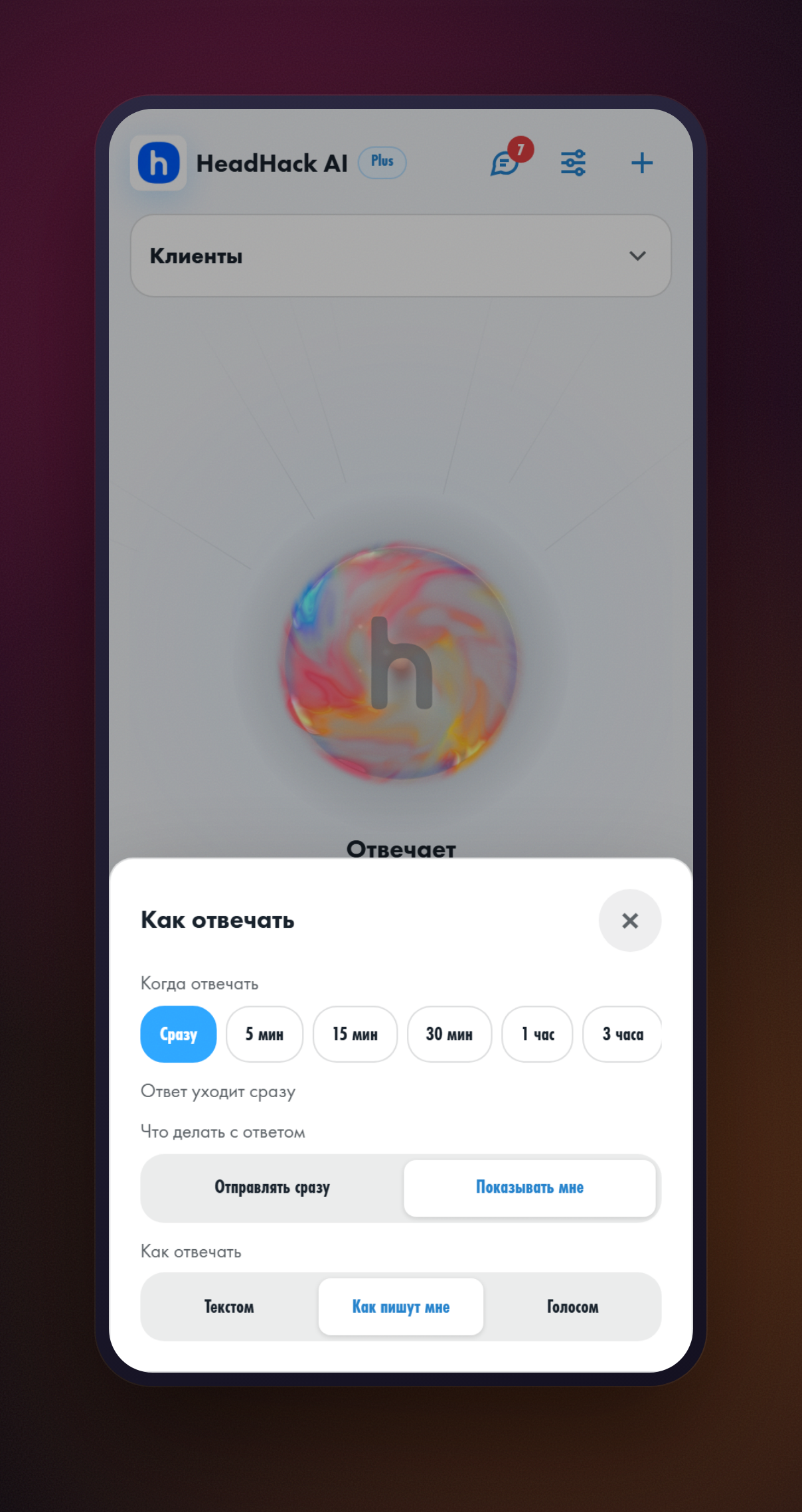
The second option is exactly for the days when you cannot get to your messages. The assistant writes the reply, you open it whenever you can and decide: send it as is, ask for “Shorter”, “Longer” or “Differently”, write it in your own words, or not answer at all. All of it on headhack.ru — no need to go into Telegram.
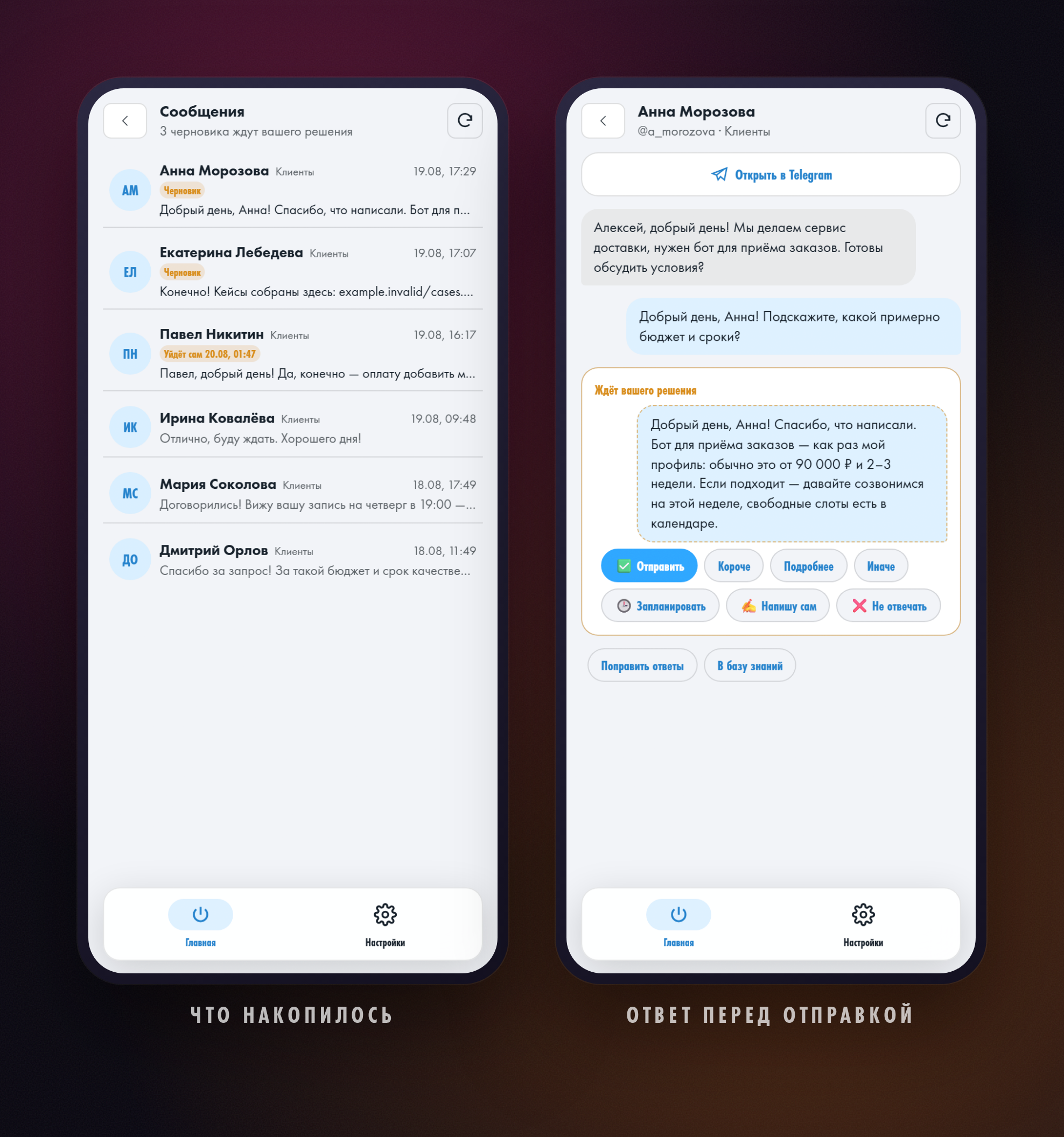
If you expect to answer yourself, set a delay — up to three hours. Wrote to the client in time and the assistant's reply is cancelled. Did not, and it goes out at the appointed moment. A draft lives for a day: decide nothing and nothing is sent. What else drafts can do is covered in a separate post.
Everything lives on the website
headhack.ru opens in any browser, on a computer and on a phone. Everything else sits next to the drafts: switching the assistant on and pausing it, what it knows about you and your work, past conversations, your plan and how many messages are left. What that looks like is in the post about setting the assistant up in a browser.
What to do once
- Open headhack.ru and press “Connect Telegram” — that is how we know whose settings to open.
- Connect your account: through Telegram Business if you have Premium, or by QR code if you do not.
- Choose what the assistant does with a reply: sends it straight away or shows it to you.
Common questions
Telegram does not work without a VPN — will my clients be left without answers?
No. The assistant runs in the cloud and answers on its own, without waiting for you to open the messenger. A client gets a reply even if you have not opened Telegram today.
Do I need a VPN to use HeadHack?
No. Settings, drafts and conversations open at headhack.ru in an ordinary browser. A VPN may be needed once — if Telegram itself will not open at the moment you confirm the login and connect your account.
Can an AI answer for me without a VPN?
Yes. The model runs in the HeadHack cloud; you do not need your own access to it. All you need is a browser and the address headhack.ru.
Do I need Telegram Premium for this?
No. With Premium the account connects through Telegram Business; without Premium it connects by QR code, the same way you add Telegram on a new device. The second route is covered in the guide AI auto-reply in Telegram for free.
Will the assistant read all of my correspondence?
No. It only works with new incoming direct messages. It does not touch old conversations, groups or channels, and you can take back access to your account at any moment.
What if a client asks something the assistant does not know?
Then keep “Show me first”: the assistant prepares an answer and you send it — or write it in your own words once you get to your messages.
Do not have an assistant yet? Write to @Head_Hack_bot — it walks you through the setup in a few minutes. How connecting works end to end is covered in the guide AI auto-reply in Telegram.
Connect the assistant to your Telegram
Open the botRead next
- Как запускать навыки HeadHack Duo через @Уже доступно. Введите @ в начале поля, чтобы выбрать доступный навык. Готовые, собственные и установленные навыки показываются в одной подсказке, а выбор заполняет черновик.
- HeadHack Duo в браузере и на телефонеУже доступно. HeadHack Duo подстраивается под широкое окно и экран телефона: навигация не перекрывает переписку, а черновик сохраняется при переходах.